> For the complete documentation index, see [llms.txt](https://docs.allscale.io/llms.txt). Markdown versions of documentation pages are available by appending `.md` to page URLs; this page is available as [Markdown](https://docs.allscale.io/virtual-account/receive-usd-on-ramp.md).
# Receive USD / On-ramp
Receive USD by ACH or U.S. Wire and have it automatically converted to USDC in your wallet.
## How to receive USD
1. Open the Virtual Account tab and click Receive USD to view your receiving account details.
2. Check the settlement network for your receiving account. Incoming USD is automatically converted to USDC and credited to your wallet on that network.
{% hint style="info" %}
USDC settlement is supported on Ethereum, Base, and Polygon. If enabled for your account, you can add receiving accounts with different settlement networks. USDT settlement requires separate activation. The options available to you are shown in your account.
{% endhint %}
3. Copy the full bank details to send USD from your bank, or share them with a payer or include them on an invoice. Once the funds arrive, conversion and wallet crediting happen automatically.
{% hint style="info" %}
Receive USD supports ACH and U.S. Wire (Fedwire).
{% endhint %}
## Fees and conversion
USD is converted to USDC at a 1:1 rate, with no exchange-rate spread. The platform fee is deducted from the received amount, and the net amount is credited to your wallet.
* **Platform fee:** The default rate is 0.6%. If you have an agreed custom rate, that rate applies. Check your account for the rate that applies to you.
* **Recommended deposit:** $50 USD or more. This is a recommendation, not a required minimum; smaller deposits are also credited.
* **Account fees:** There are currently no account-opening or monthly fees.
**Example:** If you receive $1,000 USD at the default 0.6% rate, the platform fee is $6 and your wallet receives **994 USDC**.
1,000 − (1,000 × 0.6%) = 994 USDC
## Processing time
Deposits received on weekends or bank holidays are processed on the next business day. Check the progress page for the current status of each deposit. You will receive an email when the funds are credited to your wallet.
## Track your deposits
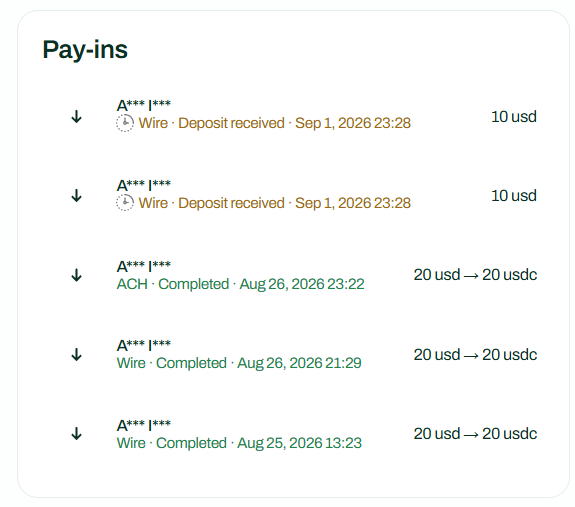
Open the Virtual Account dashboard to view your deposit history and select a deposit to see its progress: processing, minting USDC, then credited to your wallet. The details show the amount received, the platform fee, and the net amount credited.
You can also find deposits in your wallet activity alongside your onchain transactions.